Sensors#
How does the robot see? Sensors provide real-time feedback about your robot's state, letting your code react to the physical world instead of guessing.
Some types of sensors#
- Limit Switches - detects contact — see Programming Limit Switches
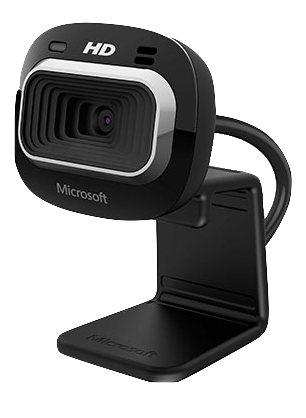
- Camera - provides sight
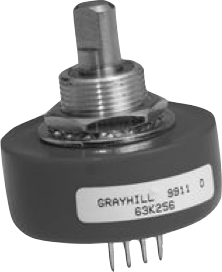
- Encoders - measures rotational or linear motion — see Programming Encoders
- Ultrasonic - measures distances
- Gyroscope - measures orientation
- Processed Vision - measures target's distance, angle, and offset from robot
- For more info on sensors see: High Tech High Top Hat Technicians - Electrical Tutorial
| Limit Switch | Grayhill brand Quadrature Encoder | Kauai Labs navX Gyro/ Accelerometer |
|---|---|---|
 |
 |
 |
Limit switches and external encoders connect to the roboRIO's Digital Input (DIO) ports. Encoders may also be built into a motor controller (SparkMax RelativeEncoder, TalonFX rotor position). Other sensor types include gyroscopes, analog inputs, and vendor-specific devices (CANcoder, Limelight, etc.). The sections below cover how to wire up and program limit switches and encoders in the command-based framework.
Programming Limit Switches#
Limit switches are simple binary sensors: pressed or not pressed. This section shows how to safely integrate them into a subsystem.
Creating the Subsystem with a Limit Switch#
Declare the DigitalInput as a private final field. This represents the physical limit switch wired to a DIO port.
Initializing the Limit Switch#
  public ShooterSubsystem() {
    // Create the limit switch on DIO port 0
    shooterLimitSwitch = new DigitalInput(0);
  }
The DigitalInput constructor takes one parameter: the DIO port number on the roboRIO (typically 0–9).
Reading the Limit Switch#
  /**
   * Returns true if the shooter limit switch is pressed (closed).
   *
   * Handles inversion here in the subsystem so callers always get
   * the correct logical value without needing to know about hardware wiring.
   * This assumes a Normally Open (NO) switch.
   */
  public boolean isLimitSwitchPressed() {
    return !shooterLimitSwitch.get();
  }
Normally Open vs Normally Closed
Switches come in two configurations:
- Normally Open (NO) — the circuit is open (disconnected) when the switch is not pressed.
DigitalInput.get()returnstruewhen unpressed. - Normally Closed (NC) — the circuit is closed (connected) when the switch is not pressed.
DigitalInput.get()returnsfalsewhen unpressed.
Recommendation: Use a Normally Open switch and invert the reading in code: return !shooterSwitch.get();. This way, if the switch wiring becomes disconnected, the robot reads the sensor as "not pressed" (false) instead of "pressed" (true). A disconnected sensor should never accidentally trigger an action.
Keep inversions in the subsystem
Always handle sensor inversions inside the subsystem method, not in commands or other classes. This way every caller gets the correct logical value without needing to know about the hardware wiring.
Using the Limit Switch in RobotContainer#
To automatically stop the shooter when the limit switch is pressed, bind it as a command in RobotContainer:
// When the limit switch is pressed, run the auto-position command
new Trigger(() -> shooter.isLimitSwitchPressed())
    .onTrue(shooter.autoPositionCommand());
This Trigger automatically runs the command when the condition becomes true. See the WPILib Trigger documentation for more binding options.
Programming Encoders#
Encoders measure rotation (motor encoders) or linear distance (external encoders). There are three common ways to use encoders in FRC:
- External WPILib Encoder — a standalone quadrature encoder on DIO ports
- Built-in motor encoder — SparkMax has
RelativeEncoder, TalonFX has rotor position feedback
External WPILib Encoder#
An external quadrature encoder connects to two DIO ports and measures shaft rotation independent of the motor controller.
Initialize it in the constructor:
  public EncoderExamples() {
    // Create an external encoder on DIO ports 0 and 1
    externalEncoder = new Encoder(0, 1);

    // Configure the external encoder
    // 1 rotation = 360 counts (4x encoding on a 90 CPR encoder)
    externalEncoder.setDistancePerPulse(1.0 / 360.0);
  }
The Encoder constructor takes two DIO port numbers. The setDistancePerPulse() method converts raw counts to a meaningful unit (usually feet or meters).
Reading Encoder Distance#
  /**
   * Gets the distance traveled using the external encoder.
   * Use this method to query the current distance in the units
   * you configured (via setDistancePerPulse).
   */
  public double getExternalEncoderDistance() {
    return externalEncoder.getDistance();
  }

  /**
   * Gets the distance traveled using the SparkMax built-in encoder.
   * This returns the position in rotations (or your configured units).
   */
  public double getMotorEncoderDistance() {
    return motorEncoder.getPosition();
  }
getDistance() on the external encoder returns distance in the units you configured. getPosition() on the SparkMax built-in encoder returns rotations (or your configured units).
  /**
   * Gets the velocity of the TalonFX in rotations per second.
   * Useful for feedback control or monitoring motor speed.
   */
  public double getMotorVelocity() {
    return motor.getVelocity().getValueAsDouble();
  }
TalonFX uses Phoenix 6's signal system. motor.getPosition().getValueAsDouble() returns rotor position in rotations. motor.getVelocity().getValueAsDouble() returns rotations per second.
Resetting Encoders#
  /**
   * Resets the external encoder to zero.
   * Use this at the start of autonomous or when you need a fresh baseline.
   */
  public void resetExternalEncoder() {
    externalEncoder.reset();
  }

  /**
   * Resets the SparkMax built-in encoder to zero.
   */
  public void resetMotorEncoder() {
    motorEncoder.setPosition(0);
  }
  /**
   * Resets the TalonFX built-in encoder to zero.
   *
   * Note: TalonFX encoder resets require setting the position via
   * the control system. The setPosition() method in Phoenix 6 is used
   * to reset the rotor position.
   */
  public void resetMotorEncoder() {
    motor.setPosition(0);
  }
Why setPosition() for TalonFX?
TalonFX encoder resets use motor.setPosition(0) instead of a dedicated reset() method. This sets the rotor position to zero in the motor's feedback system, which is how Phoenix 6 manages encoder state.
Using Encoder Commands#
Both controller types expose the same subsystem interface, so binding encoder commands in RobotContainer is identical:
// Reset both encoders at the start of autonomous
m_drivetrain.setDefaultCommand(
    m_drivetrain.driveArcade(
        () -> -controller.getLeftY(),
        () -> -controller.getRightX()
    )
);

// Bind a button to reset encoders
new JoystickButton(controller, Button.kStart.value)
    .onTrue(m_drivetrain.resetEncodersCommand());
The resetEncodersCommand() command factory is defined in the subsystem and calls the reset logic. Since both SparkMax and TalonFX implementations expose the same interface, the binding code remains unchanged — only the subsystem implementation details differ.
Knowledge Check#
Quiz results are saved to your browser's local storage and will persist between sessions.
Which sensor type is used to measure the robot's orientation?
Which type of sensor would you use to measure the distance between the robot and an object?
A limit switch is used to detect physical contact, such as a mechanism reaching the end of its travel.
When should you invert a limit switch reading in code?
What does setDistancePerPulse() do on an encoder?
Quiz Progress
0 / 0 questions answered (0%)
0 correct